For years, most people interacted with artificial intelligence through a text box.
You typed a question.
The AI returned an answer.
That simple pattern made AI useful for writing, summarizing, brainstorming and research. But it also created a limitation: much of the real world does not arrive as neatly written text.
A product problem may be visible in a photo.
A meeting may exist only as audio.
A tutorial may be stored inside a video.
A chart may contain information that is difficult to explain in words.
A handwritten page may combine diagrams, numbers and notes.
This is where multimodal AI in 2026 becomes important.
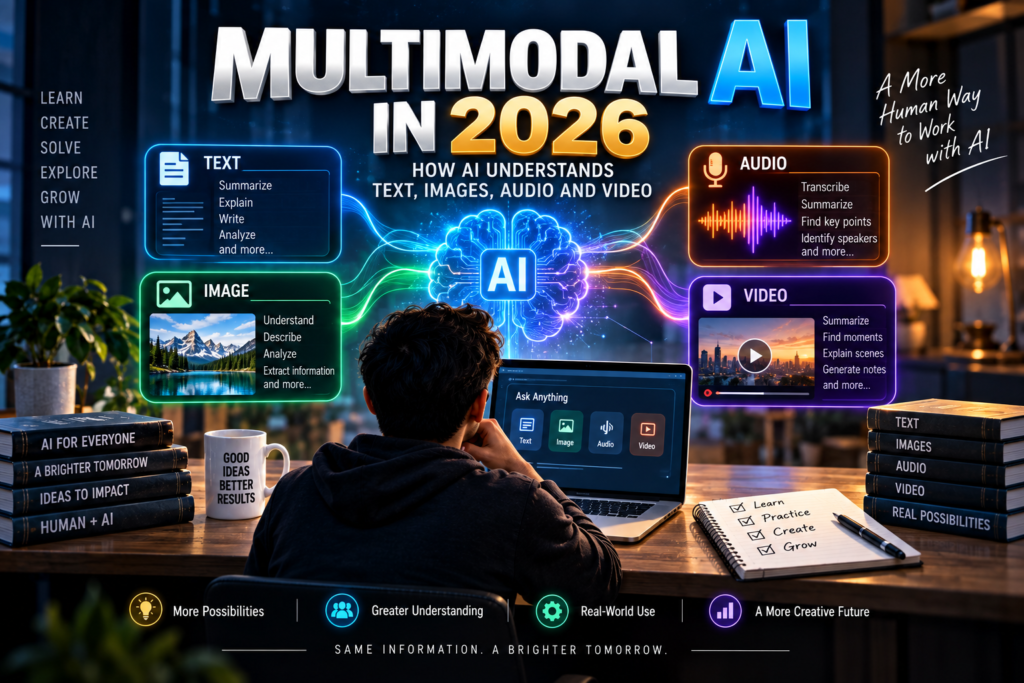
Instead of working with only one type of information, a multimodal AI system can handle several forms of input—such as text, images, audio and video—and connect them inside the same task.
That does not simply make AI more convenient.
It changes the kinds of problems people can ask AI to help solve.
What Does “Multimodal” Actually Mean?
The word can sound technical, but the idea is simple.
A mode, or modality, is one way information can be represented.
Text is one modality.
An image is another.
Audio is another.
Video combines visual movement, sound and time.
A multimodal AI system can work with more than one of these forms.
For example, you might upload a photo of a chart and ask a question about it using text.
The system receives two different types of information:
- the image containing the chart,
- the written question explaining what you want.
A more advanced workflow may involve even more.
You could provide a video, ask the AI to identify important moments, summarize the spoken explanation and create written notes from what appears on screen.
Instead of forcing everything into text first, the AI works across different forms of information.
Why Text Alone Is Not Enough
Text is powerful, but it does not capture everything easily.
Imagine that your laptop shows a strange error.
You could spend several minutes describing exactly where the message appears, what the screen looks like and which button is highlighted.
Or you could show the screen.
A student trying to understand a science diagram may struggle to describe every arrow, label and relationship.
A photo can provide that context instantly.
A creator reviewing a video may want help identifying where the introduction becomes slow.
That problem depends on timing, visuals and speech—not only a transcript.
In everyday life, people naturally combine different signals.
We listen to words while looking at facial expressions.
We understand instructions by combining spoken explanation with what someone demonstrates.
We look at maps, charts and signs while reading text.
Multimodal AI moves digital assistants closer to that way of working with information.
One Task Can Contain Several Types of Information
A useful way to understand multimodal AI is to stop thinking about separate AI tools for separate media.
Instead, think about the task.
Suppose a small business owner wants to understand customer feedback.
Some customers leave written reviews.
Others send voice messages.
Some attach screenshots.
A few send short videos showing a product problem.
The business does not really care whether the complaint arrived as text, audio or an image.
It cares about the issue.
A multimodal system can potentially help bring those different inputs into one workflow.
It may identify recurring complaints, summarize the important details and organize them by category.
The value comes from connecting information that previously had to be processed separately.
How AI Works With Images
Image understanding is one of the most visible examples of multimodal AI.
An AI system may be able to examine a photo, screenshot, chart, diagram, form or interface and respond to questions about what it sees.
That opens many practical possibilities.
A student can ask for an explanation of a diagram.
A user can upload a screenshot of unfamiliar software and ask what different sections appear to do.
A creator can compare two thumbnail designs and ask which visual elements are easier to notice.
A business owner can examine a product photo and ask for help preparing a description.
A person can show an infographic and ask for the main ideas in plain language.
However, “seeing” should not be confused with perfect visual understanding.
Images may contain small text, unclear objects, unusual layouts or missing context.
The AI may interpret something incorrectly.
So image understanding works best when the user combines the visual with a clear question.
Instead of saying:
“Explain this.”
A better request might be:
“Look at this chart and explain the difference between the blue and orange sections in simple language.”
The extra instruction helps the AI focus on the relevant part of the image.
Audio Adds a Different Kind of Context
Audio contains information that may disappear when converted into plain text.
A transcript can show the words that were spoken.
But audio may also contain pauses, changes in tone, background sounds, interruptions and differences between speakers.
In practical use, multimodal AI can help with tasks such as:
- turning spoken material into structured notes,
- identifying the main topics in a discussion,
- separating action items from general conversation,
- summarizing a lecture,
- reviewing a recorded explanation,
- organizing ideas from a voice note.
This can be useful because many ideas begin as speech rather than polished writing.
Someone walking or commuting may record a voice note instead of typing a paragraph.
Later, AI can help turn that rough spoken thought into a checklist, outline or organized summary.
The important shift is that the user does not always need to convert the audio manually before AI can help.
Video Is More Than a Collection of Pictures
Video is one of the most complicated forms of information because it changes over time.
A single image shows one moment.
A video contains a sequence.
That sequence may include speech, movement, text on screen, music, scene changes and visual context.
Consider a ten-minute tutorial.
To understand it properly, an AI system may need to recognize what is being said, what appears on screen and how the different moments relate to each other.
That can support tasks such as:
- creating chapter summaries,
- identifying major topics,
- finding important moments,
- producing notes,
- reviewing pacing,
- describing what happens in a scene,
- connecting spoken instructions with visual demonstrations.
For creators, this can make AI more useful during editing and planning.
Instead of only asking AI to write a script, the creator can potentially ask questions about the actual video.
That moves AI from pre-production into analysis of the finished media.
Multimodal AI Is About Combining Signals
The real strength is not simply that AI can process images or hear audio.
The more interesting part is what happens when different forms of information support each other.
Imagine uploading a product image and asking:
“Write a short description for this item, but focus on the visible design rather than making assumptions about materials.”
The image provides visual evidence.
The text tells the system how to use that evidence.
Or imagine sharing a chart and asking:
“Explain this graph to a beginner and then create three questions I can use to test whether I understood it.”
The chart provides the data.
The prompt defines the learning task.
Multimodal AI becomes most useful when each modality contributes something the others cannot.
A Student May Learn Differently With Multimodal AI
Traditional study often separates different learning materials.
Textbook notes are in one place.
Lecture recordings are somewhere else.
Diagrams are inside slides.
Handwritten notes may be stored as photos.
Multimodal AI can help bring these materials together.
A student could photograph handwritten notes and ask for a clean study outline.
They might upload a diagram and request a step-by-step explanation.
They could use a lecture recording to identify key concepts and then compare those concepts with their written notes.
This does not mean AI should replace studying.
It can instead reduce some of the mechanical work around studying.
The student still needs to understand the material.
AI can help organize how the material is presented.
Creators Can Move Beyond Text-Only Assistance
Content creators were among the earliest users of generative AI because writing support was immediately useful.
But creation is rarely just text.
A video creator works with script, visuals, voice, pacing, thumbnail, title and editing.
A designer thinks about layout, image composition and message.
A podcaster works with speech.
Multimodal AI can connect more of those stages.
A creator may compare several images before choosing a thumbnail direction.
They may review a video section and ask where the explanation becomes repetitive.
They may provide spoken ideas and turn them into a structured script.
They may upload a visual and ask for caption ideas that match what is actually shown.
This is different from asking AI to invent everything from scratch.
The AI becomes a layer between the creator and the media already being produced.
Businesses Can Use Multimodal AI for Messy Information
Business information is often not stored in one clean format.
A sales team has emails.
Support teams receive screenshots.
Employees attend recorded meetings.
Reports contain charts.
Customers send photos.
Operations teams may work with forms and documents.
A multimodal system can help make this messy information easier to review.
For example, a support workflow may receive a screenshot from a customer.
The AI can read the written complaint and examine the screenshot together.
That combination may provide more useful context than either one alone.
Similarly, a meeting recording can be turned into structured notes, while shared slides provide extra context about what the speakers were discussing.
The benefit is not simply “AI understands more things.”
The benefit is fewer gaps between different kinds of business information.
Multimodal Does Not Mean Always Correct
This is one of the most important things beginners should understand.
Adding more types of input does not remove AI mistakes.
It can sometimes create new ones.
A system may misread text inside an image.
It may confuse two objects.
It may miss something that appears briefly in a video.
A transcript may misunderstand a name.
A chart can be interpreted incorrectly if the labels are unclear.
Background noise can affect audio understanding.
The AI may also make assumptions about something that is not actually visible.
This means multimodal outputs should still be reviewed.
The more important the decision, the more important the verification.
If you are asking AI to summarize a casual voice memo, a small mistake may not matter much.
If you are using it to understand a contract scan, financial chart, medical image or other high-impact material, the standard should be much higher.
Better Inputs Usually Produce Better Results
Multimodal AI still depends on the information you provide.
A blurry image gives the system less to work with.
A noisy recording is harder to analyze.
A video without enough context may produce a weak summary.
An unclear question makes it harder for the system to know what matters.
A few simple habits can improve the experience.
- Use clear images when possible.
- Crop unnecessary parts if they may distract from the main subject.
- Explain what you want the AI to focus on.
- For long material, ask about a specific section rather than requesting everything at once.
- If there are labels, names or numbers that must be exact, tell the AI to pay special attention to them.
The system may support several modalities, but the quality of the task still matters.
Privacy Becomes More Important When You Upload Media
Text prompts are only one form of information people share with AI.
Photos can contain faces, documents, addresses, screens or private surroundings.
Screenshots may include account details.
Audio may contain other people’s conversations.
Videos can reveal locations, workplaces or individuals who did not expect the content to be uploaded.
That means multimodal AI requires another level of awareness.
Before uploading media, look beyond the main subject.
Ask what else is visible or audible.
A screenshot intended to show one software error may also display a personal email address.
A photo of a document may reveal an identification number.
A meeting recording may include confidential discussion.
The convenience of uploading a file should not replace basic judgment about what the file contains.
Multimodal AI Will Change How People Give Instructions
Text prompts became popular because text was the main interface.
Multimodal systems make instructions richer.
Instead of writing a long explanation, users may increasingly point to the actual material.
- “Look at this screenshot and tell me where I should click.”
- “Listen to this explanation and turn the important points into notes.”
- “Compare these two images and explain which layout is easier to understand.”
- “Review this video and identify the three sections that feel repetitive.”
The instruction becomes shorter because the media carries part of the context.
This may make AI easier for people who do not enjoy writing detailed prompts.
Showing can sometimes be faster than describing.
The Future Interface May Not Feel Like a Chatbox
Today, many people associate AI with a large text field.
That may become less important over time.
The future AI interface could feel more like working with a flexible assistant that accepts whatever form the task naturally takes.
You might speak instead of type.
Show the screen instead of describing it.
Upload a document together with a question.
Use a photo to start a task.
Switch from voice to text without beginning again.
The interaction becomes less about choosing the correct AI mode and more about communicating naturally.
That is one reason multimodal AI matters.
It reduces the distance between how information exists in real life and how AI receives it.
Beginners Should Focus on the Problem, Not the Technology
It is easy to become distracted by technical terms.
Vision models.
Speech recognition.
Audio processing.
Video understanding.
Multimodal reasoning.
These concepts matter to developers, but most everyday users do not need to begin there.
Start with a simpler question:
What information do I already have, and what result do I want?
If the useful information is inside a screenshot, use the screenshot.
If it is in a voice memo, use the audio.
If it is in a document containing charts and text, use the document.
If the task depends on what happens across a video, use the video.
Then tell the AI exactly what you want it to do with that information.
Multimodal AI is most useful when the format follows the problem.
The Bigger Change Is Not About Media
At first, multimodal AI sounds like a technical upgrade.
Text plus images.
Then audio.
Then video.
But the larger change is more practical.
AI is becoming less dependent on people translating the world into written prompts.
A user does not have to describe every visual detail.
They may not need to manually transcribe every recording.
They may not need to separate text from diagrams before asking for help.
The system can increasingly work with information closer to its original form.
That can make AI more useful for learning, creativity, accessibility, communication and everyday work.
But the same rule that applies to other forms of AI still matters here:
More capability does not remove the need for human judgment.
A system may understand several types of information and still misunderstand the situation.
The best results come when people know what the AI should examine, what outcome they want and what still needs to be checked.
In 2026, multimodal AI is not simply about giving AI more ways to receive information.
It is about giving people more natural ways to explain what they need.
And sometimes, the clearest prompt may not be a paragraph at all.
It may be a picture, a recording, a video—or all of them together.
Also Read
AI Agents in 2026: What They Are, How They Work and Why They Matter
Understand How AI Can Work Through Multi-Step Tasks
Learn how AI agents use goals, tools, feedback and human approval to manage connected workflows.
Best AI Tools for Beginners
Explore Beginner-Friendly AI Tools
Discover useful AI tools for writing, study, productivity, creativity and everyday tasks.
How to Learn AI Skills in 2026: Beginner Roadmap
Build Practical AI Skills Step by Step
Follow a simple roadmap for learning AI concepts and useful digital skills without getting overwhelmed.