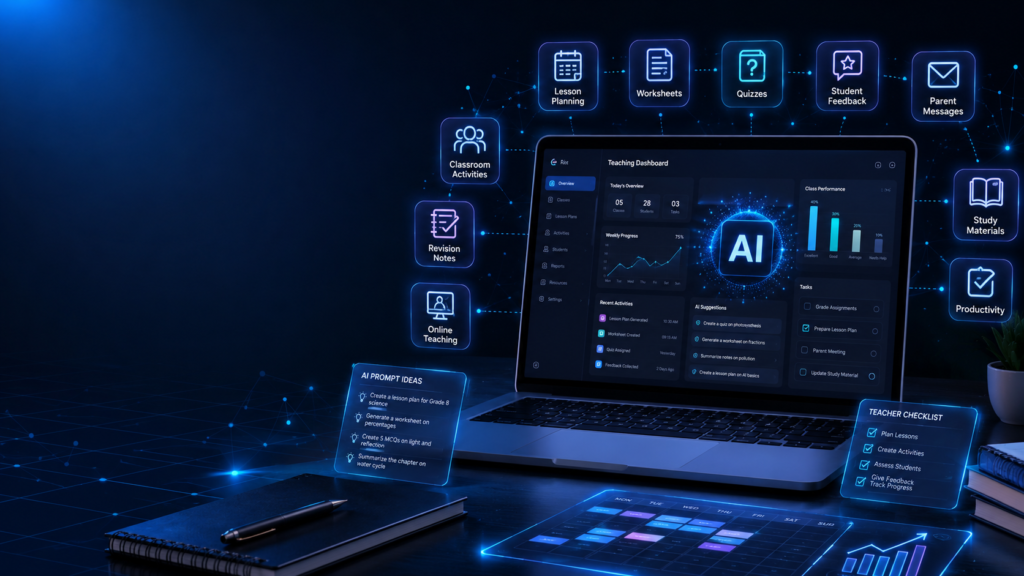
Teaching in 2026 is not only about explaining a lesson in the classroom. A teacher also has to prepare lesson plans, create worksheets, check assignments, reply to parents, support weak students, manage classroom activities, prepare tests, write feedback, and keep students engaged. For many teachers, the actual teaching time is only one part of the job. A lot of work happens before and after the class.
This is where AI tools can help.
AI tools for teachers in 2026 can save time, reduce repeated work, and make classroom planning easier. They can help teachers create lesson ideas, explain difficult topics in simple language, prepare quiz questions, write feedback, design activities, and organize weekly teaching plans.
But AI should not replace teachers. A teacher understands students in a way software cannot. A teacher can notice confusion on a student’s face, understand classroom mood, motivate a learner, and adjust the explanation in real time. AI is only a helper. The teacher is still the guide.
In this beginner guide, you will learn how teachers can use AI tools in a practical, safe, and useful way.
Why Teachers Should Use AI Tools
Teachers often repeat many tasks. They create similar worksheets, write similar feedback, prepare revision questions, and explain the same topic in different ways. These tasks take time, especially when a teacher has many students or multiple classes.
AI can help reduce this pressure.
For example, if a teacher is preparing a lesson on photosynthesis, AI can help create a simple lesson outline, key points, classroom activity, homework questions, and a short quiz. The teacher can then review the material, correct it, and adjust it for the class level.
This saves time and gives the teacher a starting point.
AI is also useful because every classroom has different learners. Some students understand quickly. Some need simple examples. Some need visual explanations. Some need extra practice. AI can help teachers prepare different versions of the same topic for different learning levels.
This makes teaching more flexible.
Best AI Tools for Teachers in 2026
ChatGPT: Teachers can use ChatGPT for lesson plan drafts, classroom explanations, quiz ideas, feedback, activity planning, and rewriting difficult topics in simpler language. Teachers should still review the final output before using it in class. OpenAI also provides education-focused resources for lesson planning and feedback.
Gemini for Education: Google’s Gemini for Education can help teachers with lesson planning, brainstorming, research, and creating personalized learning material. It is designed for education use and can also work with Google Workspace for Education.
Canva for Education: Canva is useful for creating presentations, worksheets, classroom posters, lesson materials, visual activities, and other teaching resources. Its AI features such as Magic Write can also help generate lesson ideas and classroom content.
Grammarly for Education: Grammarly can help teachers and students improve grammar, clarity, tone, and writing quality. Its education tools also support writing guidance and responsible use of AI-assisted writing.
Important: Teachers do not need to use every tool. Start with one or two tools that solve a real classroom problem, and always follow your school’s privacy and AI-use policies.
AI for Lesson Planning
Lesson planning is one of the most useful areas where teachers can use AI. A clear lesson plan helps the teacher stay organized and helps students learn better.
AI can help create a lesson structure with introduction, explanation, examples, activity, recap, and homework.
For example, a teacher can use AI to prepare a 40-minute class plan. The plan may include the first 5 minutes for warm-up, 15 minutes for explanation, 10 minutes for activity, 5 minutes for questions, and 5 minutes for summary.
This kind of planning makes the class smoother.
But teachers should not copy an AI lesson plan directly. Every school, class, subject, and student group is different. The teacher should review the plan and adjust it according to the classroom.
A good lesson plan should be simple, realistic, and easy to follow.
AI for Explaining Difficult Topics
Some topics are difficult for students because the textbook language is too formal. AI can help teachers explain the same topic in easier words.
For example, if students do not understand gravity, AI can help create a simple explanation with daily life examples. If students struggle with grammar, AI can create examples using familiar sentences. If students find math confusing, AI can break the solution into smaller steps.
This helps teachers prepare better explanations.
A teacher can also ask AI to explain a topic in different styles:
Simple explanation
Story-based explanation
Real-life example
Step-by-step method
Question-answer format
Beginner-friendly summary
This is useful because not every student learns the same way.
Still, teachers should always check the explanation. AI can sometimes give incorrect or incomplete information. The final classroom explanation should come from the teacher’s understanding.
AI for Worksheets and Practice Questions
Worksheets are important for practice, but creating them regularly takes time. AI can help teachers prepare worksheets for different subjects and difficulty levels.
A teacher can create:
Multiple-choice questions
Fill in the blanks
Short answer questions
True or false questions
Matching exercises
Word problems
Revision questions
Homework sheets
Reading comprehension questions
This is helpful for daily practice and exam preparation.
For example, a teacher can ask AI to create 15 beginner-level math questions on fractions or 10 grammar questions on tenses. Then the teacher can check the questions and use the best ones.
AI can also create different versions of the same worksheet. This is useful when teachers want extra practice for weak students or challenge questions for advanced students.
The important rule is simple: always review before giving it to students.
AI for Quizzes and Tests
Teachers can use AI to create quick quizzes for revision. A short quiz at the end of a lesson helps students remember key points.
AI can create quizzes based on topic, grade level, and difficulty. It can also provide answer keys and explanations.
For example, after teaching a science chapter, a teacher can create a 10-question quiz. After a history lesson, a teacher can create timeline-based questions. After an English lesson, a teacher can create grammar correction exercises.
Quizzes do not always need to be difficult. Sometimes simple questions are enough to check whether students understood the lesson.
AI can save time, but teachers should make sure the questions match the syllabus and class level.
AI for Student Feedback
Writing feedback for students can take a lot of time. Teachers want to be helpful, but writing detailed feedback for every student is difficult.
AI can help create feedback drafts.
For example, instead of writing only “good work,” AI can help create a more useful comment:
You have explained the main idea clearly. Try to add one more example next time to make your answer stronger.
This kind of feedback is encouraging and specific.
Teachers can use AI to write feedback for essays, projects, assignments, class participation, handwriting, improvement areas, and performance reports.
But feedback should feel personal. Students should not receive robotic comments. Teachers should edit the feedback and add real observations.
A good feedback message should guide the student, not just judge the student.
AI for Parent Communication
Teachers often need to communicate with parents. These messages should be polite, clear, and professional.
AI can help write messages for:
Homework reminders
Meeting requests
Progress updates
Attendance concerns
Behavior notes
Exam reminders
Project instructions
Positive feedback
Class announcements
For example, a teacher can prepare a polite message for parents about an upcoming test or a student’s improvement.
This saves time and avoids unclear communication.
However, teachers should be careful with privacy. Do not share sensitive student details with AI tools unless the school allows it and privacy rules are clear. It is better to write general drafts and add specific details manually.
AI for Classroom Activities
Students learn better when the class is active. AI can help teachers create classroom activities that make learning more interesting.
For example, AI can suggest:
Group discussion topics
Role-play activities
Simple experiments
Vocabulary games
Math practice games
Debate topics
Storytelling activities
Brainstorming exercises
Exit ticket questions
These activities can make a normal class more engaging.
For a history lesson, AI can suggest a role-play between historical figures. For a science lesson, AI can suggest a simple observation activity. For an English class, AI can create speaking prompts. For a math class, AI can create real-life problem examples.
Teachers should choose activities that fit the classroom size, time, age group, and available materials.
AI for Different Learning Levels
In one classroom, all students do not learn at the same speed. Some students need more support. Some students need extra challenge.
AI can help teachers prepare different versions of the same topic.
For weak students, AI can simplify the explanation and create basic practice questions. For average students, AI can create standard exercises. For advanced students, AI can create higher-level thinking questions.
This helps teachers support more students without preparing everything from zero.
For example, after teaching a grammar topic, a teacher can prepare:
Easy worksheet for basic practice
Medium worksheet for class practice
Advanced worksheet for strong students
This makes learning more personalized.
But teachers should use this carefully. Students should not feel labeled or discouraged. The goal is support, not comparison.
AI for Time Management
Teaching becomes stressful when everything is done at the last minute. AI can help teachers create weekly plans and task lists.
A teacher’s weekly plan may include:
Monday: Prepare lesson outline
Tuesday: Create worksheet
Wednesday: Check assignments
Thursday: Prepare quiz
Friday: Write parent updates
Saturday: Review weak topics
Sunday: Plan next week
This kind of planning makes the work more manageable.
AI can also help create checklists for exams, projects, events, and classroom activities.
When tasks are organized, teachers can focus more on teaching and less on confusion.
AI for Creative Teaching Materials
Sometimes students understand better when the lesson includes stories, examples, charts, or visual ideas. AI can help teachers create creative teaching material.
For example, AI can help create:
Simple stories for moral lessons
Examples for grammar topics
Science analogy ideas
Math word problems
Classroom poster text
Flashcard content
Revision summaries
Topic-wise key points
This is especially useful for younger students, language learning, and concept-based subjects.
A teacher can take the AI output and turn it into board notes, slides, charts, or printable material.
Simple and clear materials often work better than complicated ones.
AI for Exam Preparation
Before exams, teachers need to help students revise. AI can make revision planning easier.
Teachers can create:
Chapter summaries
Important questions
Practice tests
Formula sheets
Grammar revision sheets
Quick recap notes
Common mistake lists
Answer writing tips
AI can help organize these materials quickly.
For example, if students are preparing for a science test, AI can create a chapter-wise revision sheet. If students are preparing for English grammar, AI can create practice sentences. If students are preparing for math, AI can create step-by-step problem sets.
But teachers should check that the content matches the syllabus and exam pattern.
AI for Teachers Who Are Not Tech Experts
Many teachers may feel that AI is too technical. But using AI does not require coding knowledge. A teacher can start with simple instructions.
For example:
Create a lesson plan for grade 6 science on water cycle.
Make 10 easy questions on present tense.
Explain fractions in simple words for beginners.
Write a polite message to parents about homework submission.
Create a 20-minute classroom activity for vocabulary practice.
These simple prompts are enough to begin.
The key is to be specific. Mention the subject, class level, topic, time limit, and purpose. This helps AI give better results.
Safety and Ethics of AI in Teaching
AI can be useful, but teachers should use it responsibly.
First, student privacy is important. Avoid entering personal student data into AI tools unless the school has clear permission and policy.
Second, AI content should be checked. Do not trust every answer blindly. Review facts, examples, and questions before using them in class.
Third, AI should support learning, not encourage cheating. Teachers should guide students on how to use AI honestly. Students should not use AI to copy homework without understanding the topic.
Fourth, teachers should keep their own teaching style. AI should not make every lesson sound the same. A teacher’s human connection is still the most powerful part of education.
How Teachers Can Start Using AI
Teachers do not need to use AI for everything immediately. Start small.
A simple seven-day plan can help:
Day 1: Create one lesson plan
Day 2: Create one worksheet
Day 3: Create one quiz
Day 4: Improve one difficult explanation
Day 5: Write one parent message draft
Day 6: Create one classroom activity
Day 7: Review what saved the most time
After one week, teachers can decide which use was most helpful.
This slow approach is better than trying too many tools at once.
Common Mistakes Teachers Should Avoid
Do not copy AI content without checking it.
Do not use AI to replace real teaching.
Do not share private student information carelessly.
Do not make worksheets too difficult or too easy without reviewing them.
Do not use AI answers as final truth.
Do not depend on AI for classroom discipline or student motivation.
Do not forget your own experience. A teacher knows the class better than any tool.
AI is useful, but teaching is still a human responsibility.
Final Thoughts
AI tools can help teachers work smarter in 2026. They can support lesson planning, worksheets, quizzes, feedback, parent communication, classroom activities, revision material, and time management.
But AI is not a teacher. It is an assistant.
A good teacher does more than share information. A teacher guides, encourages, observes, corrects, motivates, and builds confidence. AI can prepare drafts and ideas, but the heart of teaching is still human.
The best way to use AI is simple. Use it to save time on repeated tasks. Review everything carefully. Add your classroom experience. Keep the learning personal and meaningful.
When teachers use AI wisely, it can reduce workload and improve teaching quality.
Want to learn AI in a simple way? Explore more beginner-friendly AI guides on AI Sikhoo and start building your digital skills step by step.
FAQ
Can teachers use AI tools in 2026?
Yes, teachers can use AI tools for lesson planning, worksheets, quizzes, feedback, parent communication, classroom activities, and revision support.
Do teachers need coding skills to use AI?
No, teachers do not need coding skills. They can use simple instructions to create lesson plans, questions, summaries, and teaching materials.
Can AI create lesson plans?
Yes, AI can help create lesson plan drafts, but teachers should review and adjust them according to the class level and syllabus.
Can AI help with worksheets?
Yes, AI can create practice questions, fill in the blanks, short answers, quizzes, and revision worksheets for different subjects.
Should teachers copy AI content directly?
No, teachers should always check, edit, and personalize AI content before using it with students.
Can AI replace teachers?
No, AI cannot replace teachers. It can support planning and preparation, but teaching needs human understanding, guidance, and care.
What is the easiest way for teachers to start using AI?
The easiest way is to start with one task, such as creating a lesson plan, worksheet, quiz, or parent message draft.
Also Read:
Discover beginner-friendly AI tools that can help with writing, planning, research, productivity, and daily digital work.
Best ChatGPT Prompts for Students
Learn useful ChatGPT prompts that help students study smarter, write better, revise faster, and organize learning.
AI Tools for Freelancers in 2026
Learn how freelancers can use AI for proposals, client replies, content ideas, productivity, portfolio improvement, and online work.
AI Tools for Small Business Owners in 2026
Learn how small business owners can use AI for customer replies, product descriptions, social media, local marketing, and planning.
How to Use AI for YouTube in 2026
Learn how beginners can use AI for YouTube video ideas, scripts, hooks, thumbnails, Shorts, titles, descriptions, and content calendars.